Flowchart and Pseudocode
Flowcharts
To be able to create a meaningful flowchart, an algorithm must first be created. Algorithm can be developed into Pseudocode. This takes each step and revises them into a from called structured.
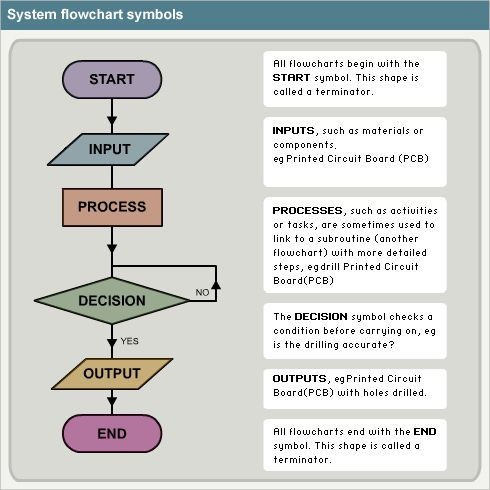
The Step-by-step instructions used to solve a problem can be used to create a diagram which is called Flowchart. It uses symbol to represent the different types of instructions. The flowchart symblos are linked togheter with arrows showing the direction of flow.
Pseudocode
The algorithm can then be taken and be changed into pseudocode. This is fake programming language.
It does not hvae any computing commands. It helps you to think through the problem and ensure that the solution work.
Before pseudocode can be written some basic programming concepts need to be understood.
| Command | Description |
|---|---|
| Variable | storage mechanism where the data can change be updated for example results of calculation |
| Constants | storage mechanism where data that does not change through the running of a program |
| Key processes | if statements, calculations |
| Repeated process | loops used to repeat specific parts of a program |
| Inputs | these are inputs into the program, this can be from the keyboard or mouse, etc... |
| Outputs | these are outputs to the screen |
Pseudocode must be laid out in a particular way. The code must be indented. This means that it must be tabbed across the page.
Think of indentation as a replacement for brackets like in math's. It means one set code is related to the outer set.
Example 1
BEGIN
    SET age
    INPUT age
    IF age is greater than 17
        DISPLAY you can vote.
    ELSE
        DISPLAY you cannot vote.
        SET vote
        END IF
END
Example 2
{
SET age
INPUT age
IF age is greater than 17
DISPLAY you can vote.
ELSE
DISPLAY you cannot vote.
SET Vote
}
Which is easier to read?
- Example-1
- Example-2
How to Write Pseudocode
| Command | Execute | Description |
|---|---|---|
Start/End | BEGIN and END | Used to show the start of the program and the end of the program |
Input | INPUT, READ or OBTAIN | This is anything entered into the program |
Outputs | PRINT or DISPLAY | This is to display something to the user or send something to the printer |
Processes | CALCULATE, SUM or GENERATE | This is carries out an action or task |
Variables | SET or INITIALISE | Initialise a variable to be used to store data or update the data |
Loop/Iteration | WHILE REPEAT - UNTIL | a loop (iteration that has a condition at the beginning) a loop (iteration) that has a condition at the end |
Decision/Conditional | IF - THEN - ELSE | a decision (selection) in which a choice is made any instructions that occur inside a selection or iteration are usually indented |
Repeats
Repeat is a command that create a repetiontion for a spcific block of code. This is called "for loop"
{
REPEAT
    DISPLAY Insert card
    INPUT card details
    SET card details
    IF card is invalid
        card not accepted
    ELSE
        card is accepted
UNTIL card is accepted
SET oddNumbers to 0
FOR count = 1 to 10
    DISPLAY count
    SET count + 2
END FOR
}
IF
These use a condition to make a decision
{
IF card is invalid
        card not accepted
    ELSE
    card is accepted
}