Methods
Method/Function/Procedure
A function is a group of instruction that toghter perfoem a task that will help the class acieve the overall goal, aslso it returns a value.
A procedure is a function that doesn't return a value.
A method can be either function or procedure or both
note
A program is broken up into sections. Each section is called a class. Each class will have some goal that needs to achieve.
A class is further broken down into sections called functions.
Every C# program has at least one class with a special method named Main. The main method has a task to start the program running.
The first line of a function/method is called a signature. It gives the name of the method nd each parameter variable.
It also specifies the datatype of each parameter and the return type of the data to be returned if being used.
Simple Method Structure
public means all the program can see the mothod called Access Specifier.
void means no value will be returned once the task is complete.
storeData is the name or the identifier of the method. This could be anything.
The () brackets are used to pass data called arguments to soething called parameters. Parameters are a variation
of a variable that is used by the method to store data that has been passed to it
The example below shows a signature for procedure as it uses void.
public void storeData ( PARAMETERS GO HERE){
    //Instruction go between the curly brackets
    disply();
}
Method/Function Return Signature
Sometimes a function will perform an action, such as a calculation and need to return the result back to the main body of the code.
To do this a return line is added to the function and the word void is replaced with the datatype if the value being returned
public int32 sumScores ( PARAMETERS GO HERE) {
    // Calculation...
    return totalResult;
}
Method/Procedure with arguments
The argument is data that is passed into the method. It is placed in the brackets into the parameters.
public void add (int nOne, int nTwo){
    int result;
    result = nOne + nTwo;
}
Examples
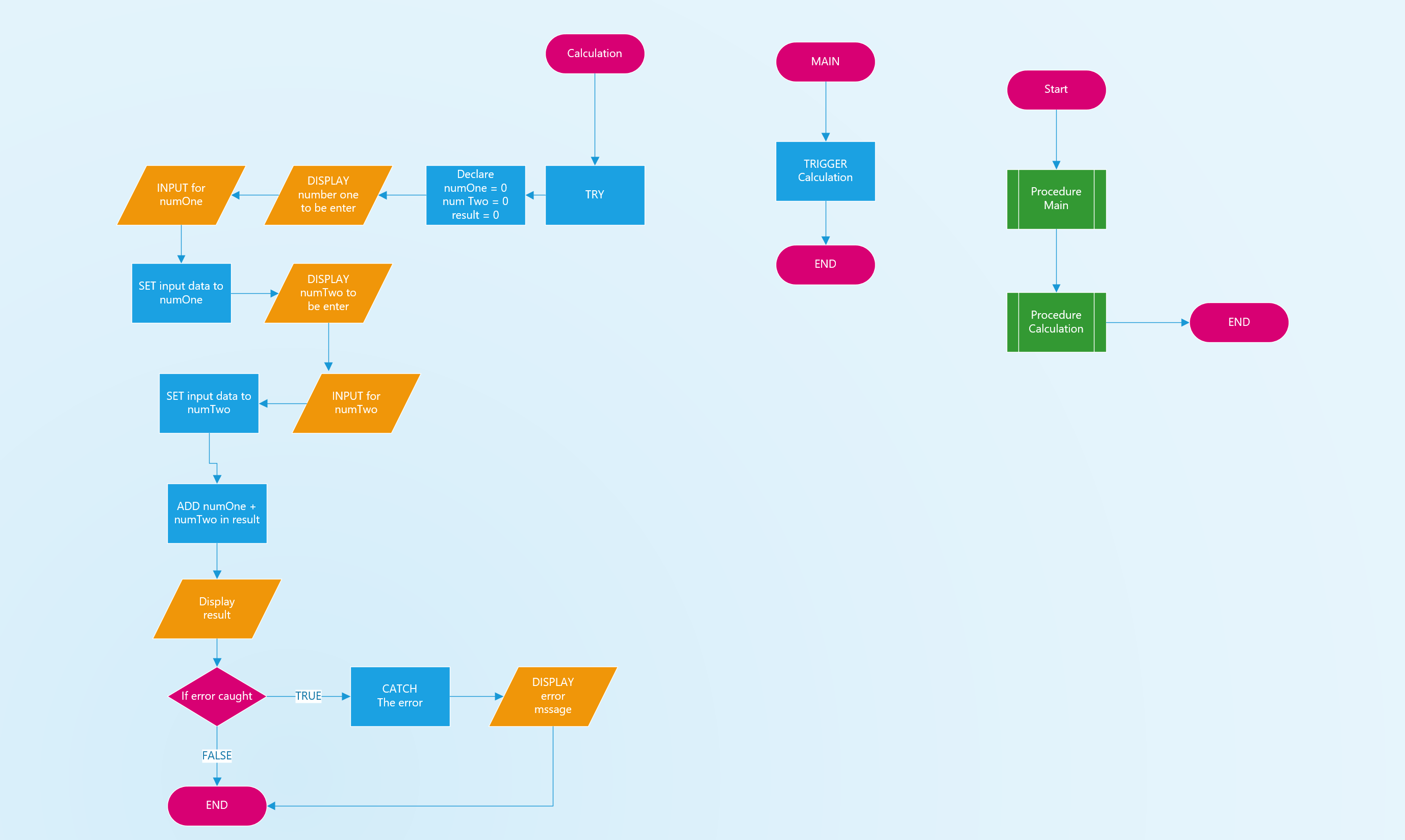
The example below shows a pseudocode of a procedure:
BEGIN

    PROCEDURE MAIN

        TRIGGER myCacl

    END PROCEDURE

    PROCEDURE myCalc

        DECLARE numOne, numTwo, result

        TRY
            DISPLAY Input first number
            INPUT numOne
            SET input to numOne
            DISPLAY Input second number
            INPUT numTwo
            SET input to numTwo
            ADD numOne and numTWo in result
            DISPLAY result

        END TRY
        CATCH

            DISPLAY enter a number

        END CATCH

    END PROCEDURE

END
The example below shows a flowchart made with Viso: