Interrupts
User Events
An event is a message sent by an trigger to signal the occurrence of an action
The action could be cause by user interaction, such as a button click, or it could be raised by some other part of the program, such as changing a property's value.
The item that raises the event is called the object sender. The object sender doesn't know who will receive (handle) the events it raises.
It simply sends the message and it is up to other parts of the program to respond to the event.
Why is OS Event Driven Process?
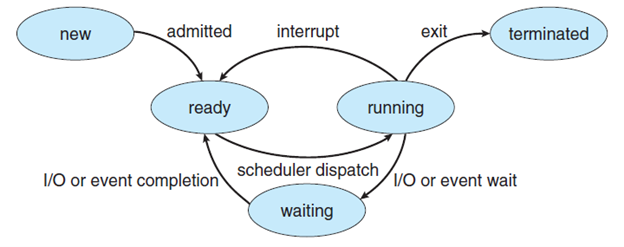
A process is created when a program is executed. This means it is loaded into memory. Each process has a main thread. Process life cycle starts when a program is executed.
- Start – this is when the process is first created by the O/S.
- Ready – Process is ready to run in the processor. It will be placed into a register that has
- Running – This is when a process is assigned the state of running by the O/S Scheduler and is moved into the CPU.
- Waiting – Moves the process into the waiting state when it requires a resource or has to be removed
- Exit/Terminated – The OS moves the process to the terminated state and is then removed from main memory.
Process Life Cycle
The image below shows a diagram of process life cycle:
Process Control Board (PCB)
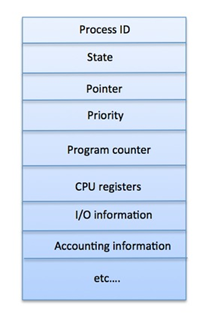
A Process Control Board keeps all the information needed to keep track of a process as listed below in the table.
The OS maintains all PCBs in Process Scheduling Queues.
The OS maintains a separate queue for each of the process states
All the process that has PCBs with same state will be placed in the same queue.
Scheduler
- Job queue – this queue keeps all the processes in the system
- Ready queue – this queue keeps a set of all processes residing in main memory, ready and waiting to execute. A below process is always put in this queue.
- Device queues – The processes which are blocked due to unavailability of an I/O device constitute this queue.
Interrupts
An interrupt is a function of an operating system that provides multi-process multi-tasking. The interrupt is a signal that prompts the operating system to stop work on one process and start work on another. Interrupts is an event external to the currently executing process that causes a change in the normal flow of instruction of execution.
The interrupt can come from a hardware source or can be generated by software programs.
This can be seen as someone making the call and the phone ringing to alter you that a call is being made.
A software interrupt, can also be called an exception, is an interrupt that is caused by software, usually by a program in user mode.
An interrupt is a signal to the kernel that an even has occurred, and this results in changes in the sequence of instructions that is executed by the CPU.
One of the two main types of interrupts, a hardware interrupt, is a signal to the system from an event that has originated in hardware, such as the pressing of a key on the keyboard, a movement of the mouse or a progression in the system clock.
Hardware Interrupt
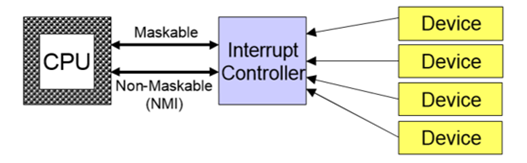
Each device is given a wire that It can use to signal the processor
When interrupt signalled, processor executes a routine called an interrupt handler to deal with the interrupt No overhead when no requests pending
Software Interrupt
When it receives a software interrupt signal, the CPU may temporarily switch control to an interrupt handler routine, and the process in the kernel that was suspended by the interrupt will be resumed after interrupt has been accommodated.
Each type of software interrupt is associated with an interrupt handler, which is a software routine that takes control when the interrupt.
Typically there are two parts to interrupt handling:
- The part that has to be done immediately, so that device can continue working
- The part that should be deferred for later, so that we can respond to the device faster
Polling
CPU periodically checks each device to see if it needs service. It does not react to a trigger or interaction.
- It takes CPU time even when no requests pending
- Overhead may be reduced at expense of response time can be efficient if events arrive rapidly