Storage
Hierarchy of storage
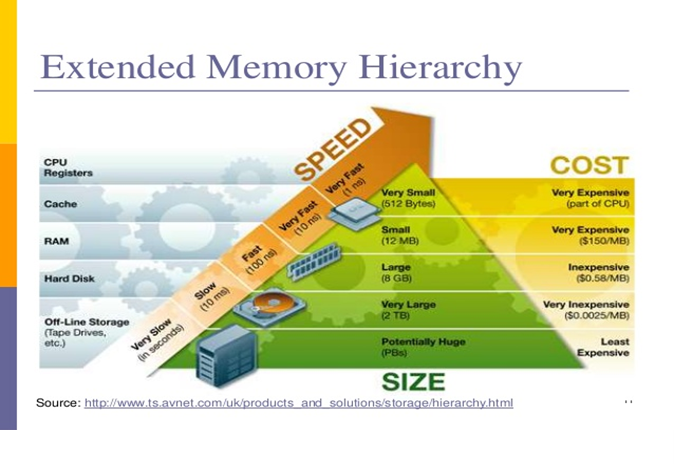
The features of storage devices affect the performance and the performance of the computer system that you are using
There is a hierarchy of storage the larger secondary storage devices are generally slower while smaller main memory devices on the processor are faster.
How Features Affect Performance
When using any type of storage device, the performance of that device can depend on a number of different factors, such as:
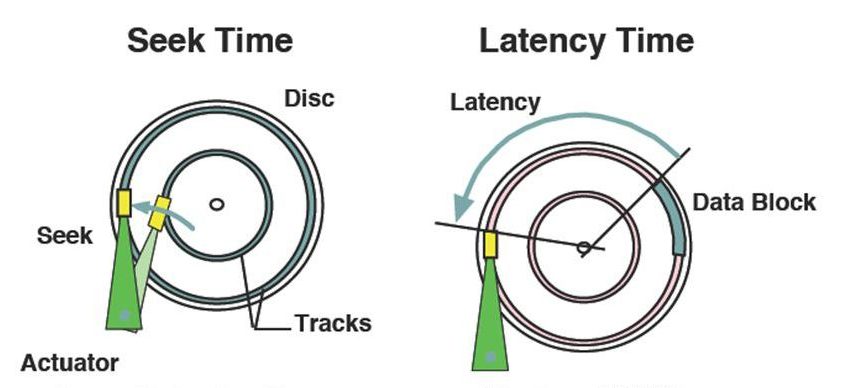
Rotational latency
this can also be known as rotational delay; this is the amount of time it takes the desired sector of the disk to rotate under the read write heads on the disk drive. The average rotational latency for a disk is half the amount of time it takes for the disk to make one rotation. The term is only applied to rotating storage devices such as disk drives and floppy drives.
Seek time
This refers to be amount of time it takes the devices to locate a particular piece of data.
Data transfer
Internal disk transfer rate, is the speed at which the data is transferred from the disk surface to the controller while external data transfer rate is the speed of which the data is moved between the disk control and the memory.
Fragmentation
The transfer rate will depend on the final fragmentation. The more the physical file is fragmented across the disc the slower the access time will be.
Storage
- Hard Disk (HDD)
- Solid State Drive (SDD)
- Cache
Hard Disk (HDD)
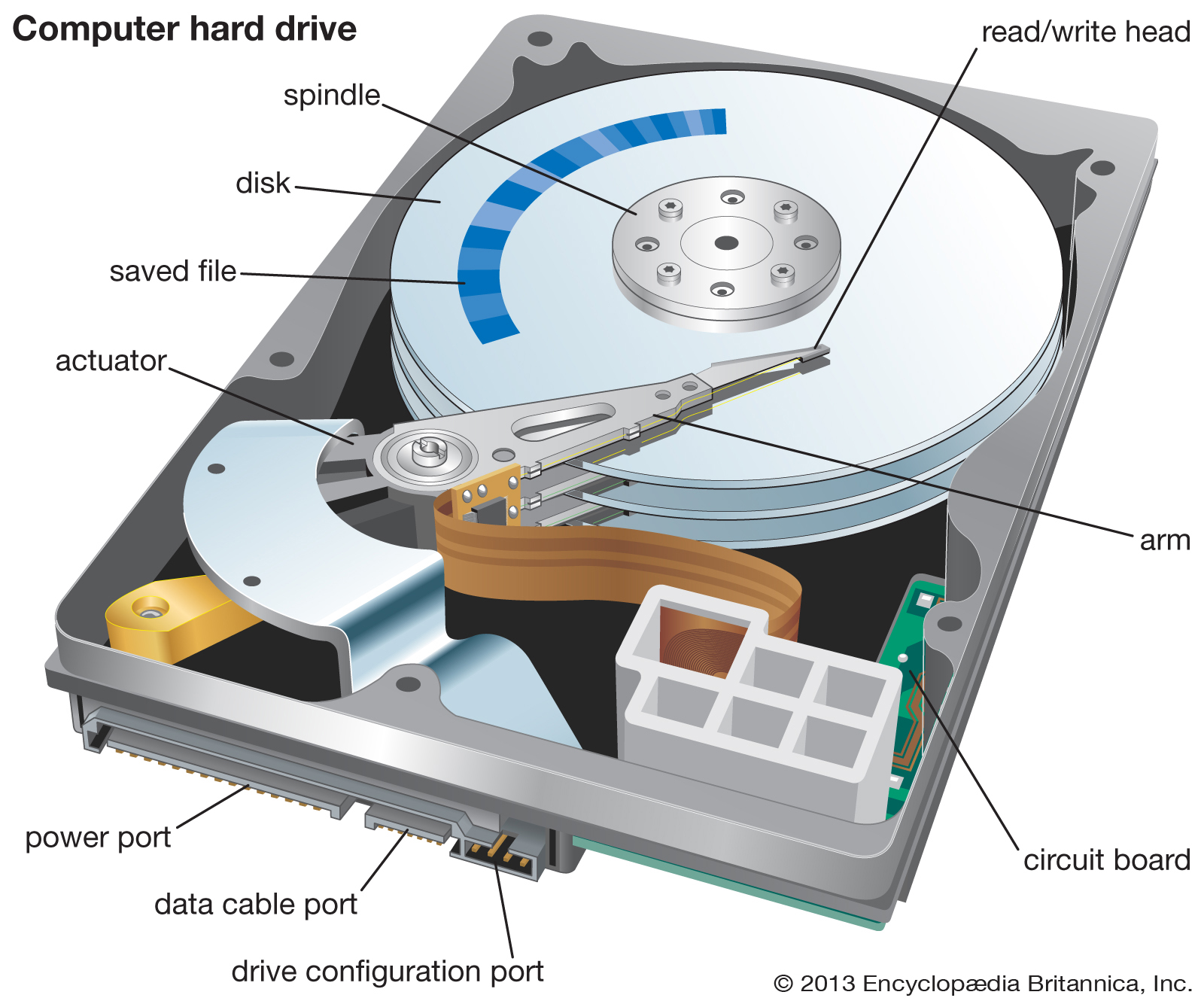
A hard disk spins a very high-speed rotating round the tracks, the arm moves in and out very quickly to different parts of the sector it reads, and it writes as it tracks the sector to the disc controller the controller then interrupts the CPU which moves the data to the main memory.
Solid State Drive (SDD)
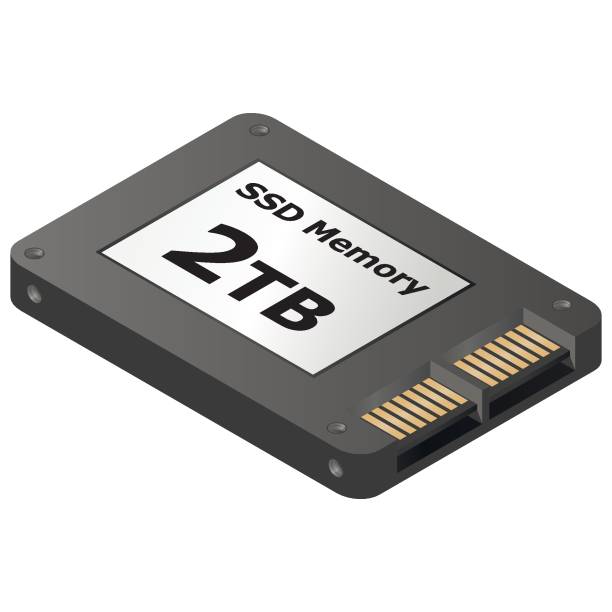
Solid State Drive also known as SSD is a storage device used in computers. SSDs replace traditional mechanical hard disks by using flash-based memory, which is significantly faster.
A solid-state drive (SSD) Is made up of integrated circuits, Integrated circuits are an electronic circuit formed on a small piece of semiconducting material, which performs the same function as a larger circuit made from discrete components. Other types of integrated circuits include:
- Microprocessors
- Memory Chips -Graphic Processing Units
info
The new solid-state drives work completely differently than HDD. They use a simple memory chip called NAND is a type of non-volatile flash memory, which has no moving parts and near-instant access times.
Cache
A disk cache is a memory buffer with a disc system or part of RAM which holds data likely to be needed Next to speed up data transfer.
info
- In a web browser – when you visit a web page, the content is saved locally on your computer so that if you revisit the page later, large files cam be simply reloaded locally rather than downloaded again. This is used extensively with images, CSS and JavaScript files.
- On a web server – if a web server needs to fetch information from a database order to serve pages to clients, but that information is the same for multiple requests, the server could be programmed to cache the results of the database queries locally, so that subsequent requests can use the cached information rather than requesting the information form the database server every time it is needed. It is always faster to load a resource locally than it is to request it from a remote source.
Cache in CPUs
CPUs simply loop around the Fetch-Decode-Execute-Store cycle. They can operate at speeds of billions of operations per second.
Without cache memory, the CPU would spend a significant proportion of its time waiting for data and instructions to be fetched from the system RAM, which would create a performance bottleneck.
Cache

In an ideal world, when the CPU needs data, it should be available instantly so as not to slow down the processing operation. But alas, it is not an ideal world - we need to have a system that can speed things along as fast as possible. This is the purpose of the cache.
A cache is a small, but extremely fast, type of RAM. It is often located inside the CPU chip itself. The diagram below explains why it is needed.
But RAM is comparatively slow to access when compared to the speed at which the registers work. So to help speed up the processing time, cache memory is used to store instructions or data that are either frequently used, have recently been used or are about to be used. This means that they don't have to be fetched directly from RAM.
Control Unit (CU)
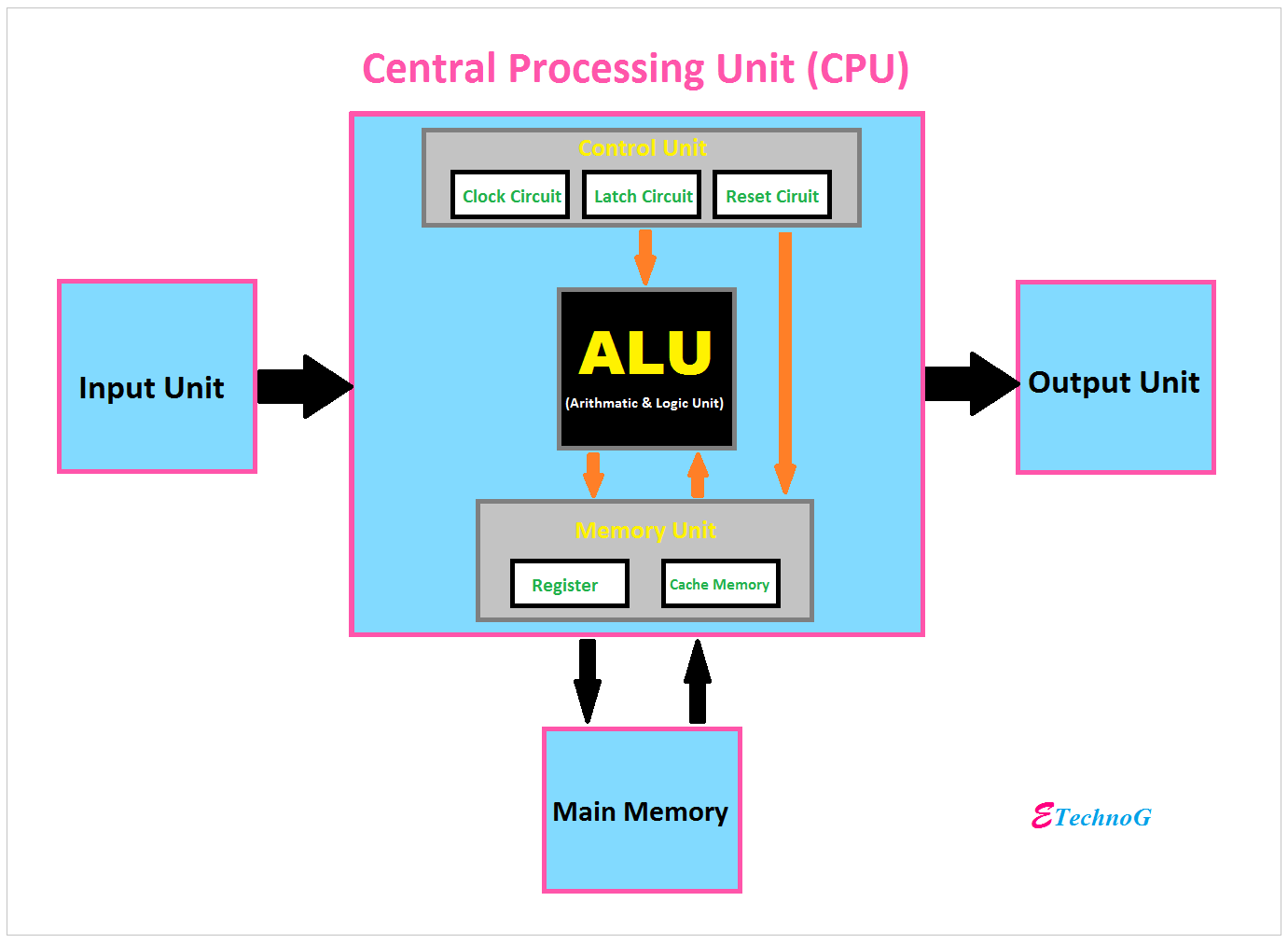
The control unit is part of the central processing unit (CPU).
It controls the flow of information through the processor, and coordinates the activities of the other units within it.
It is also referred as "brain within the brain", as it controls what happens inside the processor, which controls the rest of the PC.
It links the arithmetic logic unit (ALU) with the system memory. It conducts operations. for example, it accepts data from the system memory (RAM), passes the data through ALU for performing the operations it has to, and returns processed data back to the system memory (RAM).
Arithmetic and Logic Unit (ALU)
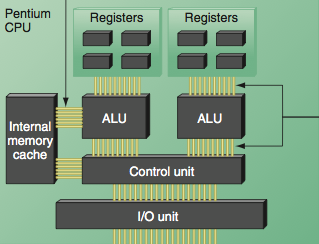
The Arithmetic Logic Unit (ALU) handles the data processing inside the CPU. It consists of two types of processing:
- Arithmetic operation - it performs standard arithmetic operations such as addition, subtraction, multiplication, etc...
- Logic operation - it deals with logic and comparisons such as 'is this value greater than that value' the answer is always either 'true' or 'false'.
info
Some CPUs contain more than one ALU. One may only carry out fast fixed point calculations whilst another one is optimised for floating point calculations
Registers
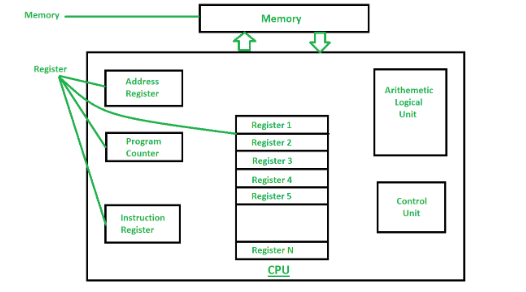 A 'register' is a type of memory inside the CPU.
A register can hold a data value. For example an 8 bit CPU has a number of 8 bit registers, a 16 bit CPU has 16 bit registers and so on. Registers are used to hold temporary data while a software program is running. As the CPU processes the data, the software program will shift the data in and out of the registers.
It is much faster to shift data to and from the registers rather than in and out of the Cache or RAM (Random Access Memory) and so this speeds up the processing time. There are usually many registers available inside the CPU. Some registers in the CPU have a specific purpose and so they have their own name.
Memory Data Register (MDR) and Memory Address Register (MAR) - Registers
- Memory Data Register (MDR)
- Memory Address Register (MAR)
- In order for the CPU to fetch an instruction from main memory (RAM), the instruction is temporarily stored in a special register called the Memory Data Register (MDR).
- Data (unlike instructions) goes both ways. Data can be fetched from main memory and brought to the CPU to be processed. After processing, it may be sent back to RAM to be stored (short term). All data must pass through the MDR whether it is on its way to the CPU or RAM.
- All data and instructions pass via the data bus.
- Every instruction or data in main memory (RAM) is located at a specific location. This location has a unique address, just like a house has its own unique address.
- The address of the data or instruction being accessed is temporarily stored in the Memory Address Register.
- This address is passed to RAM by means of the address bus.
Data storage and Recovery (RAID)
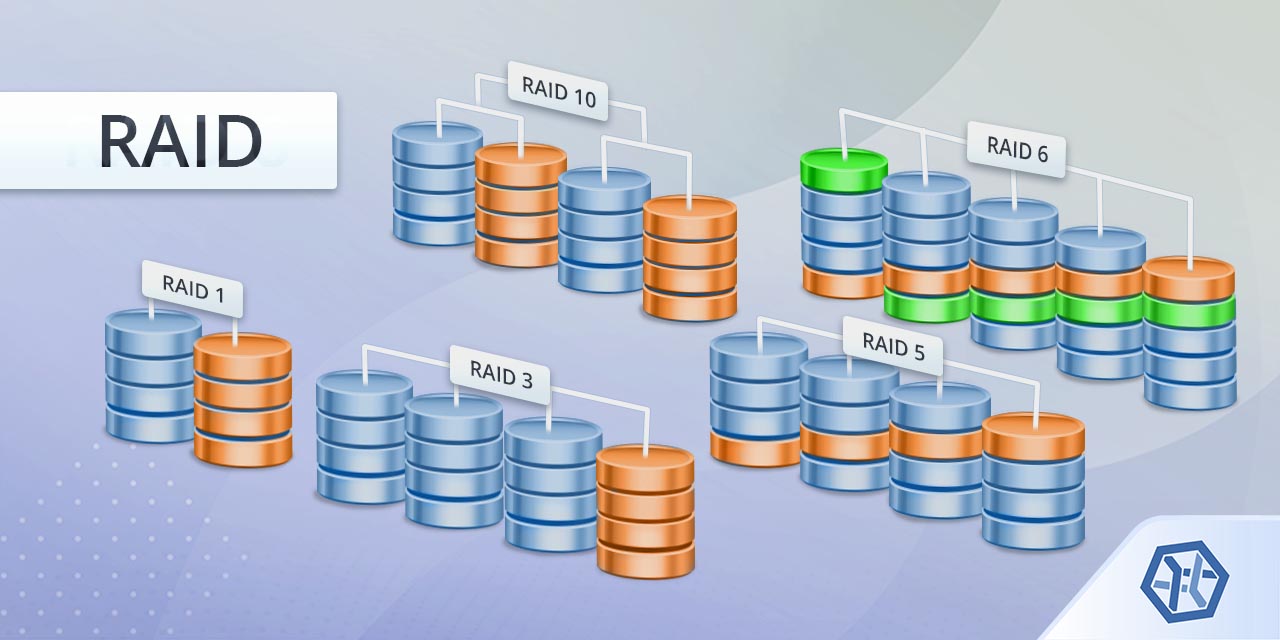
Redundant Array of independent Disks or RAID systems are used when more than one hard drive or solid-state drive are used in a computer at the same time. There are several raid standards that use data redundancy to duplicate data across the drives this improves speed and data security.
Data Storage and Recovery (NAS)
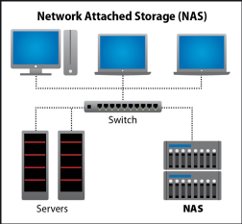
Network attached storage (NAS) is a server solely operating to serve files on a network or standalone Computer System.
note
NAS is normally a plug and play device that is conceived for large systems but is often used either as a mail server or for home systems.
The advantages of using NAS are:
- Fault tolerance
- Large backup capabilities
- Manageable onsite storage
- Share mass storage facilities